If your business is registered under GST, you may need your GST Registration Certificate for banking, vendor onboarding, tenders, business verification, or internal records.
The certificate is issued electronically in Form GST REG-06. The GST portal provides an option to view and download it after login; a physical certificate is not issued by the government.
This guide explains the GST registration certificate download process step by step, what to do if the certificate is not visible, and some common mistakes to avoid.
What is a GST Registration Certificate?
A GST Registration Certificate is the official certificate issued to a taxpayer after GST registration is approved. It is issued in Form GST REG-06 and contains important registration details associated with the taxpayer.
The certificate can be downloaded directly from the GST portal. According to the GSTN’s taxpayer guidance, registered taxpayers can access it through the portal rather than receiving a physical certificate.
The certificate may be required when:
- Opening or updating a business bank account
- Completing vendor or customer verification
- Registering with marketplaces or other business platforms
- Participating in certain tenders
- Providing GST details to customers or suppliers
- Maintaining business compliance records
How to Download GST Registration Certificate Online
The GST registration certificate download process is straightforward once you have access to your GST portal account.
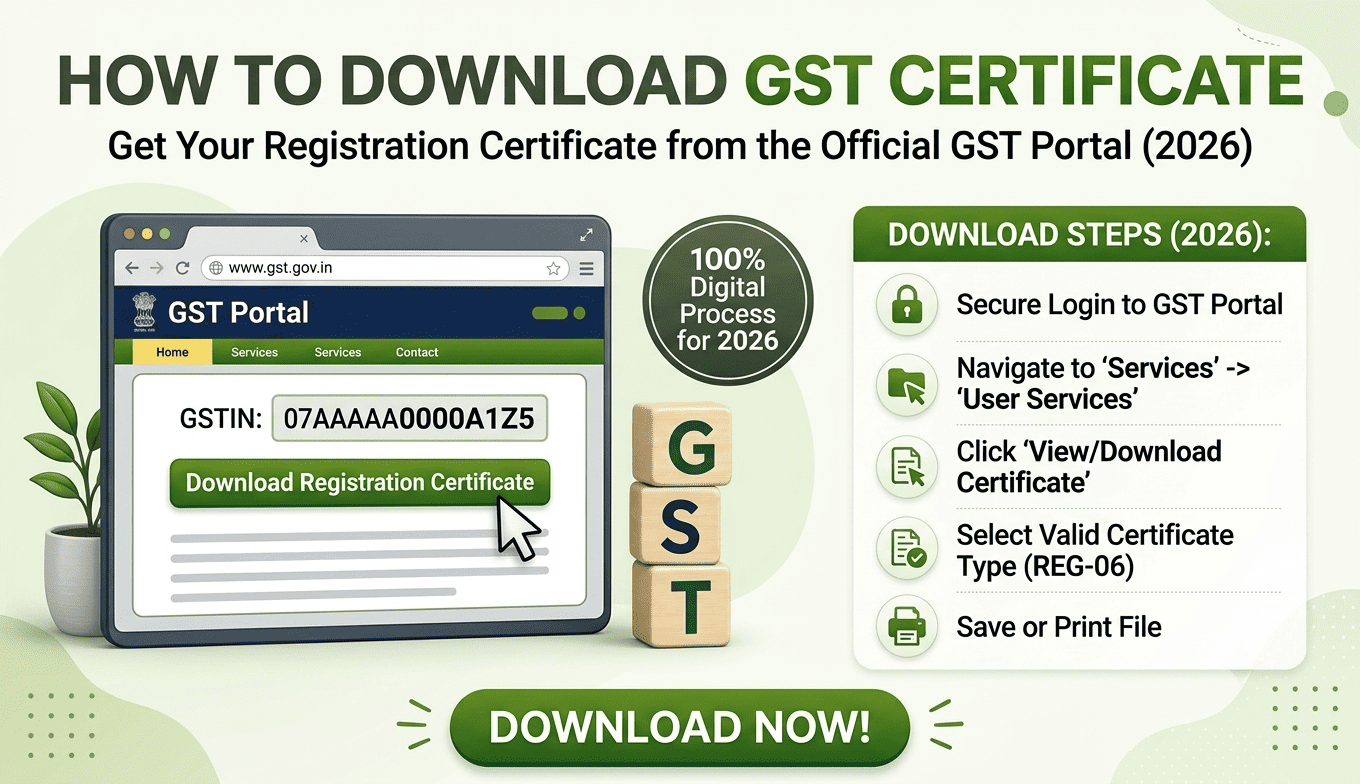
Step 1: Visit the GST Portal
Go to the official GST portal and click Login.
You will need your GST portal login credentials. GSTN’s user guide confirms that taxpayers can log in using their GSTIN and password, subject to the portal’s authentication process.
Step 2: Log in to your GST account
Enter:
- Username
- Password
- Captcha
Complete any additional authentication requested by the portal.
If you have forgotten your username or password, the GST portal provides separate options to retrieve the username or reset the password using OTP verification.
Step 3: Open User Services
After logging in, go to:
Services → User Services → View/Download Certificates
This is the official GSTN navigation path for accessing the registration certificate.
Step 4: View your GST Registration Certificate
The available certificate details will appear on the screen.
Look for your Registration Certificate / Form GST REG-06.
GSTN has also introduced functionality allowing taxpayers to access the latest registration certificate from areas such as the taxpayer profile.
Step 5: Download the certificate
Select the relevant certificate and use the available Download option.
The certificate will be downloaded electronically, generally as a PDF that you can save for your records.
Tip: Keep a copy of the latest certificate in your business records, especially if your GST registration details have been amended.
What Information Does the GST Registration Certificate Contain?
The GST REG-06 certificate contains key details associated with your GST registration.
Depending on the registration, these can include information such as:
- Legal name of the business
- Trade name, where applicable
- GSTIN
- Constitution of business
- Principal place of business
- Additional places of business, where applicable
- Date of liability
- Effective date of registration
- Type of registration
- Details relevant to the registration
The certificate is therefore more than just a document showing your GSTIN. It provides a formal record of the registration details available on the GST system.
What If the GST Registration Certificate Is Not Available?
Sometimes a taxpayer logs in but cannot immediately find the certificate.
This does not necessarily mean that the GST registration has failed.
GSTN’s published guidance says that after approval of a registration application, the registration certificate is updated on the portal within 24 hours. If it is still unavailable, GSTN recommends trying again after clearing browser cookies and history or using another browser.
Try these steps:
- Confirm that the GST registration application has actually been approved.
- Log out and log in again.
- Go to Services → User Services → View/Download Certificates.
- Check the taxpayer profile for the latest certificate.
- Clear your browser’s cookies and history.
- Try another browser.
- If the issue continues, check the GST portal’s current technical guidance or contact GST support.
A common situation
Suppose a business owner receives confirmation that the GST registration has been approved and immediately tries to download the certificate.
If the certificate has not yet appeared, repeatedly submitting another application is unnecessary. The better approach is to allow the portal time to update and then check the certificate section again.
How to Download an Amended GST Registration Certificate
If your GST registration details have been amended, make sure you are using the latest version of the certificate.
GSTN has provided functionality for generating coloured GST REG-06 certificates for amended registrations and for downloading the latest registration certificate through the taxpayer profile.
This matters because an older PDF may contain information that no longer reflects the current registration.
For example, if the registered business details have changed through an approved amendment, use the latest available certificate when providing GST registration proof to another party.
GST Registration Certificate vs GST Registration Number
These two terms are often used interchangeably, but they are not the same thing.
| GSTIN | GST Registration Certificate |
|---|---|
| A unique GST identification number | Official registration document |
| Used to identify the registered taxpayer | Shows registration details |
| Commonly required on invoices and GST documents | Commonly used as registration proof |
| 15 character GST identification number | Issued in Form GST REG-06 |
Your GSTIN is included in your registration records and certificate, but downloading the certificate gives you the formal registration document rather than just the number.
Can You Download the GST Certificate Without Login?
The normal download process requires you to access the GST portal as an authenticated taxpayer.
The official GSTN guidance specifically directs taxpayers to log in and then navigate to Services → User Services → View/Download Certificate.
So, if someone asks you to provide your GST registration certificate, the safest approach is to download it directly from your GST account rather than relying on an old copy received from another person.
What Should You Check After Downloading the Certificate?
Before sending the PDF to a customer, bank, supplier, or other organisation, quickly check the important details.
1. GSTIN
Make sure the GSTIN is correct.
2. Legal name
Check that the legal name matches your current business records.
3. Trade name
If a trade name is applicable, verify that it is displayed correctly.
4. Business address
Check the principal place of business and other relevant registration details.
5. Registration details
Look at the effective date and type of registration.
6. Latest version
If you have made changes to your registration, make sure you are sharing the latest certificate rather than an older saved PDF.
This simple check can prevent unnecessary back and forth when the certificate is being used for business verification.
Common Mistakes During GST Certificate Download
Mistake 1: Looking under the wrong menu
A common reason people cannot find the certificate is simply that they are looking through the registration application section.
The official path is:
Services → User Services → View/Download Certificates.
Mistake 2: Using an old certificate
Businesses sometimes keep the original certificate downloaded when GST registration was first approved.
If registration details have subsequently changed, check whether a newer certificate is available.
Mistake 3: Assuming a physical certificate will arrive
GST registration certificates are available electronically through the GST portal. GSTN’s taxpayer guidance states that the government does not issue a physical certificate.
Mistake 4: Panicking when the certificate does not appear immediately
If registration has recently been approved, the certificate may take some time to become available on the portal. GSTN’s current published guidance says the registration certificate is updated within 24 hours after approval.
Mistake 5: Sharing outdated registration information
If a business has amended its registration, always check the latest certificate before submitting it elsewhere.
Illustrative Example: A Small Business Needs Its GST Certificate
Situation:
A growing trading business is onboarding with a new corporate customer. The customer asks for the company’s GST registration certificate.
Problem:
The owner has the GSTIN saved in WhatsApp but cannot find the original certificate PDF.
Action:
The owner logs into the GST portal and goes to Services → User Services → View/Download Certificates.
Result:
The latest GST registration certificate can be downloaded from the portal.
Lesson:
Knowing where the certificate is stored on the GST portal is more useful than keeping multiple outdated PDFs across email, WhatsApp and different computers.
How Accounting Software Can Help After GST Registration
Downloading the GST registration certificate is a one time administrative task. The larger challenge for many businesses is managing the GST and accounting work that follows.
Once a business is registered, its day to day workflow can involve:
- Creating GST invoices
- Recording purchases and sales
- Tracking GST related transactions
- Preparing GST reports
- Monitoring receivables and payables
- Maintaining accounting records
- Reviewing financial statements
This is where accounting software can become useful.
For businesses that want to manage accounting and GST processes in one place, WebLedger Books provides accounting functionality including GST reports, e-invoicing, e-way bills, inventory management, P&L, balance sheet and business reporting.
The important distinction is that accounting software does not replace the GST portal for accessing the official registration certificate. The certificate should be obtained from the GST portal itself.
GST Registration Certificate Download: Quick Checklist
Before you finish, use this checklist:
- GST registration has been approved
- GST portal login credentials are available
- Logged in to the GST portal
- Opened Services → User Services
- Selected View/Download Certificates
- Checked the latest GST REG-06
- Verified GSTIN and business details
- Downloaded and saved the PDF
- Used the latest certificate if registration details were amended