If you are starting a business, selling products or offering services in India, you will probably need a GST number to operate legally. This number, officially called the Goods and Services Tax Identification Number (GSTIN), lets you collect GST, issue tax invoices and claim eligible Input Tax Credit (ITC).
The whole registration process is online and runs through the official GST portal. In this guide, we cover who needs to register, which documents to keep ready, how to apply and what to do once you get your number.
What Is a GST Number (GSTIN)?
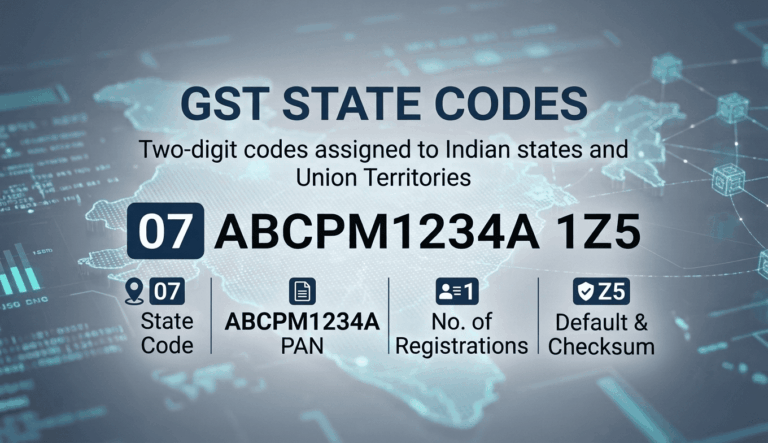
A GSTIN is a unique 15 digit number given to your business once the GST registration goes through. The government uses it to identify registered taxpayers and keep track of their GST transactions.
Here is how the number is built:
- First 2 digits: State code.
- Next 10 digits: Your business PAN.
- 13th digit: Entity code, used when you hold more than one registration under the same PAN in a state.
- 14th digit: A default character (Z).
- 15th digit: A checksum character.
You will use this GSTIN on your tax invoices, GST returns and other tax documents.
Who Needs GST Registration in India?
Whether you need to register depends on your annual aggregate turnover, the kind of business you run and the nature of your supplies.
In general, these turnover limits apply:
| Business Category | General Registration Threshold |
| Suppliers of services | Rs.20 lakh |
| Suppliers of goods | Rs.40 lakh in eligible states |
| Special category states | Lower limits may apply |
Note that the Rs.40 lakh limit for goods does not apply the same way everywhere. Some states have a Rs.20 lakh limit or even lower.
In some situations, registration is compulsory whatever your turnover, subject to the exemptions and exceptions that apply. These include:
- Certain businesses making inter-state taxable supplies.
- Persons liable to pay tax under specific reverse charge provisions.
- Casual taxable persons making taxable supplies.
- Non-resident taxable persons making taxable supplies.
- Input Service Distributors.
- Certain e-commerce operators, and suppliers who sell through e-commerce platforms.
Important: Some exceptions apply to compulsory registration. Read the relevant GST provisions before you decide whether registration is mandatory for you.
Documents Required for GST Registration
Keep these documents ready before you start the application.
| Document | Purpose |
| PAN Card | Business identification |
| Aadhaar Card | Identity verification, where applicable |
| Photograph | Proprietor, partners or authorised signatory, as applicable |
| Business address proof | Verification of principal place of business |
| Bank account details | Bank verification, where applicable |
| Business constitution proof | Partnership deed, incorporation certificate, etc. |
| Authorisation letter | Authorised signatory, where applicable |
For address proof, you can use:
- An electricity bill or property tax receipt, if you own the premises.
- A rent or lease agreement, if the premises are rented.
- An ownership document or consent letter, where applicable.
Which documents you actually need depends on your business structure and who owns the premises.
How to Get a GST Number Online in India?
You can apply for GST registration directly on the official GST portal. Here is how it works.
Step 1: Visit the GST Portal
Go to the official GST website and open: Services → Registration → New Registration.
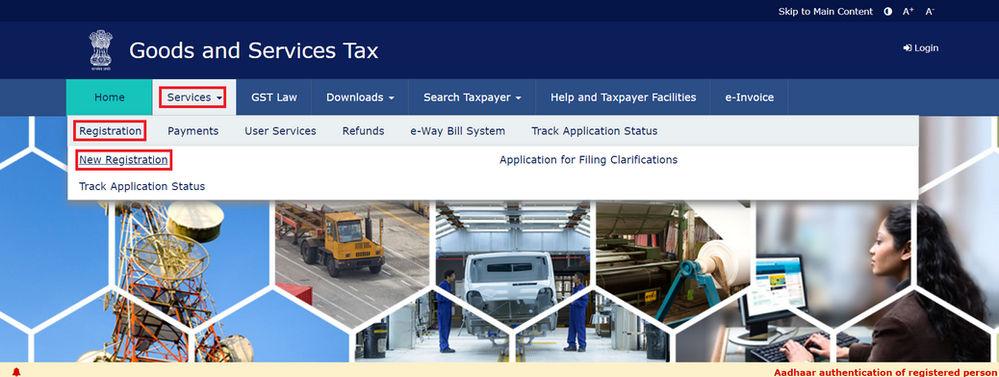
Click ‘New Registration’ and pick the taxpayer category that fits you.
Step 2: Enter Basic Business Details
Fill in the first part of the form with:
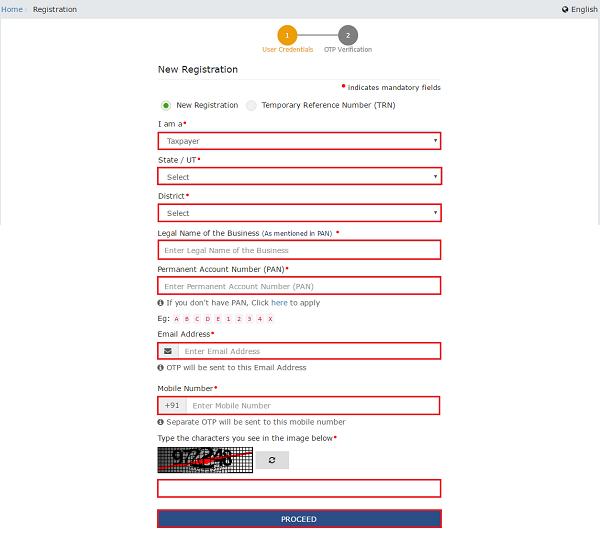
- Legal name of the business.
- PAN number.
- State and district.
- Email address.
- Mobile number.
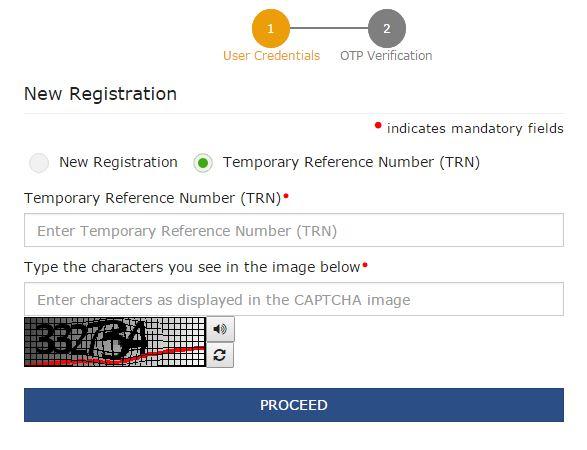
Verify your email and mobile number with the OTPs you receive. Once that is done, you will get a Temporary Reference Number (TRN).
Step 3: Complete the GST Registration Application
Log in with your TRN and fill in Part B of Form GST REG-01.
You will need to give details under these sections:
- Business details.
- Proprietor, partners or directors.
- Authorised signatory.
- Principal place of business.
- Additional business locations.
- Nature of goods and services supplied.
Then upload your supporting documents in the format the portal asks for.
Step 4: Complete Aadhaar Authentication
If Aadhaar authentication applies to your application, complete it at this stage.
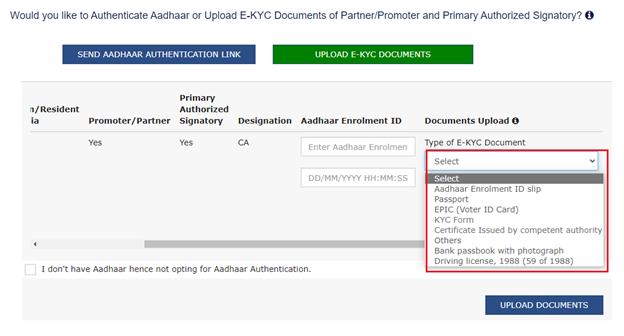
Depending on your case, you may be asked to do OTP-based authentication, or to visit a designated GST Suvidha Kendra for biometric verification and document checks.
Step 5: Submit Your Application
Go through all the details once more before you submit.
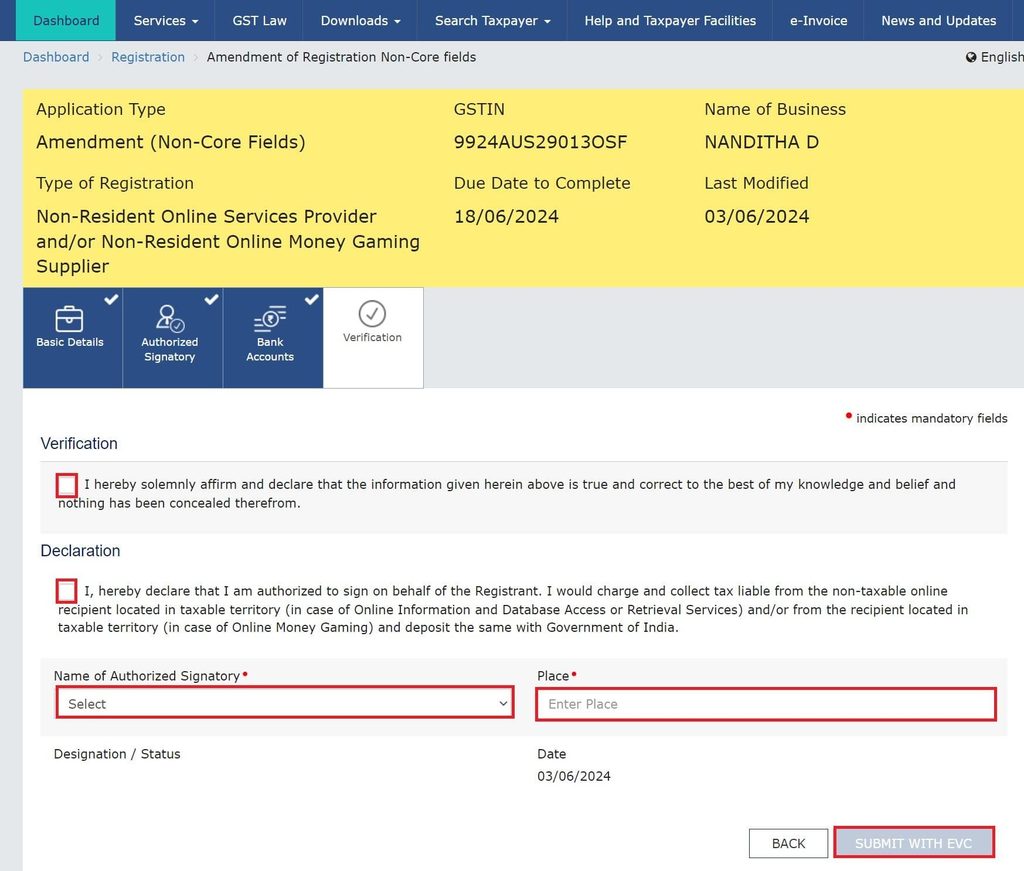
You can then authenticate the application using whichever method applies to you, such as:
- Electronic Verification Code (EVC).
- Digital Signature Certificate (DSC), where required.
- Other permitted verification methods.
Once submitted, you will receive an Application Reference Number (ARN).
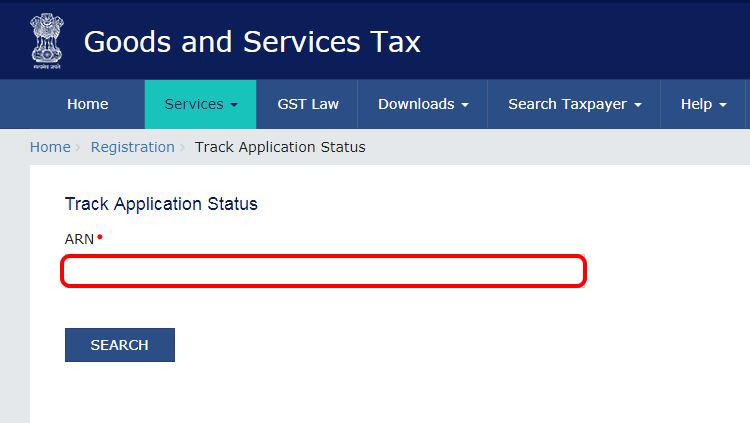
Step 6: Track Your GST Registration Status
Use the ARN to check your application status on the GST portal.
If the tax officer needs more information or clarification, you may get a notice in Form GST REG-03. You have to reply through Form GST REG-04 within the time given.
Once your application is approved, the GST registration certificate (Form GST REG-06) and your GSTIN will be available on the portal.
How Long Does GST Registration Take?
The time it takes depends on your application category, the verification needed and whether the officer asks for clarification.
Where officer verification is required, the prescribed timeline generally allows up to seven working days from the date you submit the application. Cases involving Aadhaar authentication or physical verification follow different timelines.
If your documents are incomplete or there are mismatches, approval can get delayed.
Common GST Registration Mistakes to Avoid
Even a small error during registration can lead to queries or delays. Watch out for these:
- Incorrect business address: Make sure the address matches your supporting documents.
- PAN mismatches: Enter the legal name exactly as it appears against your PAN.
- Incorrect business constitution: Choose the right category, such as proprietorship, partnership or company.
- Wrong HSN or SAC details: Pick the correct classification codes for your goods or services.
- Ignoring GST notices: Check your registered email and application status regularly.
What Should You Do After Getting Your GST Number?
Getting your GSTIN is just the start. From here on, you need to keep proper GST records and meet your compliance requirements.
After registration:
- Download your GST registration certificate and display it as required.
- Mention your GSTIN on applicable tax invoices.
- Charge GST at the correct rates.
- Keep sales and purchase records.
- Reconcile your purchase records with GSTR-2B for eligible ITC claims.
- File the applicable GST returns by their due dates.
- Keep proper records of credit notes, debit notes and payments.
If you handle a lot of invoices and transactions, accounting software can make all of this easier to keep in order.
How WebLedger Books Can Help
Once you have a GST number, keeping your accounting and GST records accurate becomes a regular job.
WebLedger Books lets you manage accounting, GST invoicing, inventory and financial reporting from a single platform. It offers GST reports, GSTR-1 JSON generation, GSTR-2B reconciliation, e-invoicing, e-way bills and real-time Profit & Loss and Balance Sheet reports.
It can work well for traders, wholesalers and growing businesses that want better control over their accounting and GST workflows.
Frequently Asked Questions (FAQs)
How can I get a GST number for my business?
Go to the official GST portal, fill in Form GST REG-01, upload the required documents and submit your application.
Is GST registration free in India?
Yes. If you apply directly through the GST portal, there is no government fee for registration.
Can I get a GST number without a shop?
Yes. You can register using an eligible residential or other business address, as long as you provide acceptable address proof.
Can an individual apply for GST registration?
Yes. Individuals who run a business as sole proprietors can apply.
Is GST registration mandatory for small businesses?
Not always. It depends on your turnover, business activity, location and the compulsory registration provisions that apply.
How many digits are there in a GST number?
A GSTIN has 15 alphanumeric characters.
Can I apply for GST registration online?
Yes. The full application process is available on the official GST portal, though some applicants may need to go through physical verification.
Can I have multiple GST numbers?
Yes. A business can hold separate GST registrations in different states or Union Territories, subject to the applicable rules.
What happens if my GST registration application is rejected?
You will receive an order stating that the application is rejected, along with the reasons. You can fix those issues and apply again, subject to the applicable provisions.
Do I need accounting software after GST registration?
It is not compulsory. That said, it can help you manage invoices, GST records, reconciliations and financial reports more efficiently.