Udyam Registration helps eligible micro, small, and medium enterprises (MSMEs) establish their registration with the Ministry of Micro, Small and Medium Enterprises, Government of India. If you are a business owner, accountant, or lender, verifying an Udyam Registration Certificate can help you confirm an enterprise’s registration details before proceeding with a business transaction.
You can verify Udyam Registration online through the official government portal. This guide explains how to check an Udyam Registration Number, verify certificate details, and avoid common mistakes.
What Is Udyam Registration Verification?
Udyam Registration verification is the process of checking an enterprise’s registration details against the records available on the official MSME portal.
An enterprise receives a permanent Udyam Registration Number after completing the registration process. Its registration certificate also contains a dynamic QR code that can be used to access the enterprise’s details on the government portal.
Verification is useful when a bank, buyer, supplier, accountant, or business partner needs to confirm an enterprise’s registration information.
How to Verify Udyam Registration Online
Follow these steps to check an Udyam Registration Number online.
Step 1: Visit the official Udyam portal
Open the Government of India’s official Udyam Registration website: https://udyamregistration.gov.in/
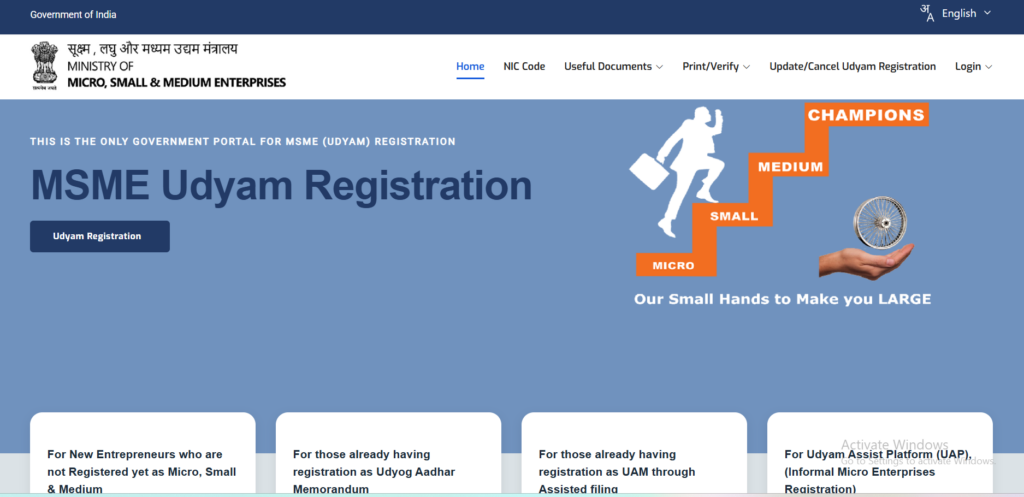
Always check the website address before entering information. The government warns that private websites and agencies are not authorised to carry out official MSME registration.
Step 2: Open the verification page
Visit the official Udyam Registration verification page.
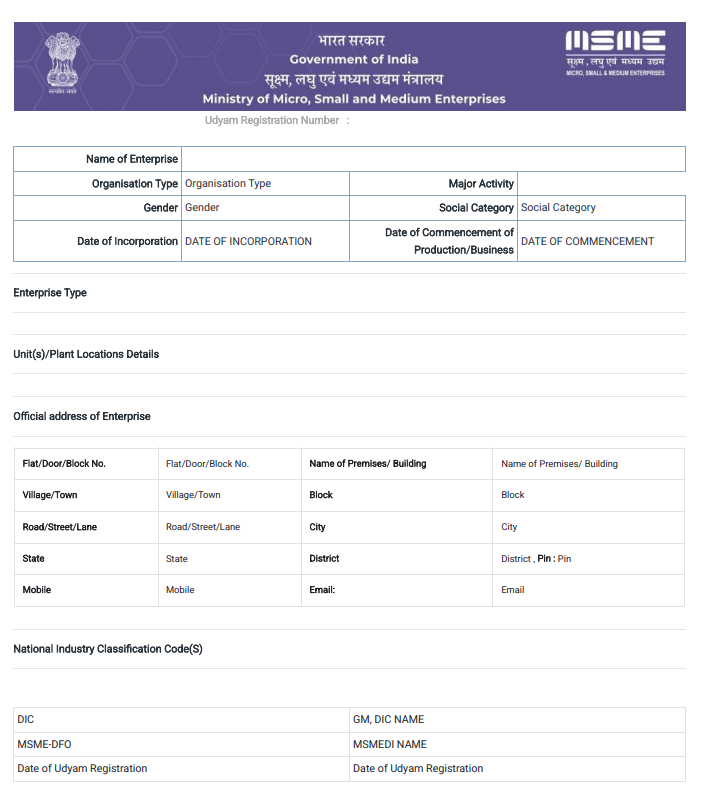
Look for the section titled Verify Udyam Registration Detail.
Step 3: Enter the registration details
Enter the required Udyam Registration Number in the relevant field. Complete any additional verification requested by the portal.
Check the number carefully before submitting the information.
Step 4: Review the registration details
The portal can display details associated with the registration, including:
- Name of the enterprise
- Organisation type
- Major business activity
- Enterprise category
- Date of Udyam Registration
- Official business address
- National Industry Classification (NIC) codes
The information displayed depends on the fields available on the portal.
Step 5: Match the information with the certificate
Compare the information displayed online with the Udyam Registration Certificate provided by the business.
Pay particular attention to the enterprise name, registration number, address, and other relevant details. If information does not match, investigate the discrepancy before relying on the certificate.
How to Verify an Udyam Registration Certificate Using a QR Code
An Udyam Registration Certificate contains a dynamic QR code that provides access to the enterprise’s registration details on the official portal.
To check a certificate using its QR code:
- Open the camera or QR-code scanner on your smartphone.
- Scan the QR code printed on the certificate.
- Check the destination before opening the link.
- Confirm that the page belongs to the official government portal.
- Compare the displayed information with the certificate.
If the QR code does not work, try checking the registration number through the official portal instead.
What Should You Do If You Cannot Find Your Udyam Registration Number?
If you have lost your registration number, you can use the official portal’s facility for retrieving a forgotten Udyam Registration Number.
Visit the Forgot Udyam Registration Number page.
Select Udyam Registration as the registration option, choose the registered mobile number or email option, and enter the corresponding details. Follow the instructions to validate the OTP.
After successful verification, the portal can display the registration numbers associated with the provided details.
Common Mistakes to Avoid When Verifying Udyam Registration
Keep these points in mind when checking an enterprise’s registration.
- Using unofficial websites: Use the government portal rather than relying on third-party websites as proof of registration.
- Entering an incorrect number: Check the Udyam Registration Number carefully before submitting it.
- Ignoring mismatched details: Investigate differences between the certificate and the online record.
- Trusting a certificate image alone: A screenshot or printed copy should not replace verification against the official record.
- Confusing registration with eligibility: Confirming registration does not automatically establish eligibility for every MSME scheme, loan, tender, or benefit. Applicable conditions must be checked separately.
Illustrative Example: A Business Verification Check
Suppose a wholesaler receives an Udyam Registration Certificate from a new supplier. Before accepting the supplier’s MSME status for an internal business process, the wholesaler checks the registration number on the official portal.
The online record displays the supplier’s enterprise name and other registration details. The wholesaler compares these details with the submitted certificate and investigates any discrepancies before proceeding.
The lesson: Online verification provides an additional check against official records and helps businesses make better-informed decisions.